引言
在企业级系统中,数据导出Excel 是非常常见的需求。本文基于实际项目经验,分享如何使用EasyExcel实现复杂报表导出,包含:
支持按天/按小时导出数据
使用模板填充Excel
支持多 Sheet、多段写入
使用注解设置单元格样式
实现月度数据聚合与格式优化
一、数据报表导出常见场景
用户行为日志导出(按小时、日、月粒度)
电商交易报表(时间区间、订单、金额汇总)
运维监控数据导出
业务经营分析数据导出(如本文场景)
二、常用 Excel 导出方案对比
| 技术方案 | 特点 | 优缺点说明 |
|---|---|---|
| Apache POI | 功能强大,支持复杂格式 | 复杂笨重、内存占用高 |
| JXL | 轻量级 | 不支持 Excel 2007+(.xlsx) |
| EasyExcel(推荐) | 阿里开源,流式处理,速度快 | 对模板语法有一定学习成本 |
| CSV 导出 | 简单快速 | 不支持样式、格式、合并单元格等 |
三、为什么选择 EasyExcel?
支持大数据量导出,写入不容易 OOM
模板填充能力强,能与设计好的 Excel 模板结合
支持注解方式配置样式、美化表格
支持多个 Sheet、多段写入
API 友好,文档完善
四、EasyExcel 使用详解
1、基本写法
EasyExcel.write(outputStream, MyData.class)
.sheet("报表")
.doWrite(dataList);
2、使用模板导出(推荐)
ExcelWriter writer = EasyExcel
.write(outputStream, MyData.class)
.withTemplate(templateInputStream)
.build();
WriteSheet sheet = EasyExcel.writerSheet().build();
writer.fill(variableMap, sheet);      // 填充 {{变量}}
writer.write(dataList, sheet);        // 填充数据区域 {}
writer.finish();
五、样式注解介绍
EasyExcel 提供了丰富的注解用于设置单元格样式,无需写 handler:
@ColumnWidth(15)
@ContentStyle(
fillPatternType = FillPatternTypeEnum.SOLID_FOREGROUND,
fillForegroundColor = 42,
verticalAlignment = VerticalAlignmentEnum.CENTER,
horizontalAlignment = HorizontalAlignmentEnum.CENTER
)
@ContentFontStyle(
fontName = "宋体",
fontHeightInPoints = 12,
bold = BooleanEnum.TRUE
)
@Data
public cl编程客栈ass StatisticsData {
private String statTime;
private String regionName;
private Integer userCount;
private BigDecimal amount;
}
解释:
@ContentStyle设置单元格背景色、对齐方式等@ContentFontStyle设置字体名称、字号、加粗等@ColumnWidth设置列宽
六、Excel 模板导出详解
为什么使用模板?
使用模板导出可以:
预设表格样式与布局
避免 Java 中繁琐的样式处理
支持多段数据写入(如月份汇总)
和美术设计好的 Excel 完美结合
模板示例结构
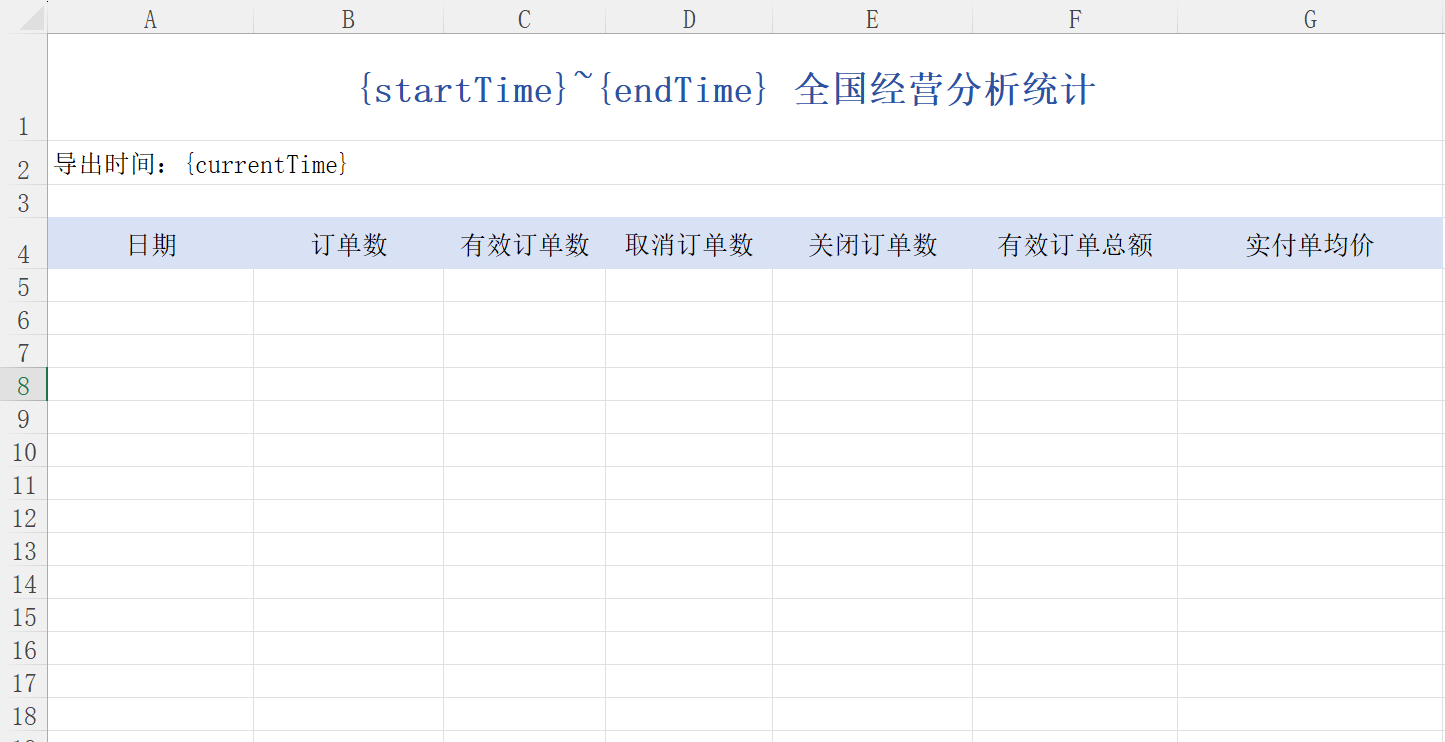
| A列 | B列 | C列 |
|---|---|---|
| 统计时间: | {{startTime}} ~ {{endTime}} | |
| 当前时间: | {{currentTime}} | |
| 月份: | {{month}} | |
| 日期 | 用户数 | 销售额 |
| {data} | ||
| 月汇总: | {monthAggregation} |
Java 填充代码
ExcelWriter excelWriter = EasyExcel
.write(response.getOutputStream(), StatisticsData.class)
.withTemplate(getClass().getClassLoader().getResourceAsStream("static/day_statistics_template.xlsx"))
.autoCloseStream(false)
.registerWriteHandler(easyExcelUtil)
.build();
Map<String, Object> map = new HashMap<>();
map.put("startTime", "2025-01-01");
map.put(JtwvjOEKh"endTime", "2025-01-31");
map.put("currentTime", "2025/05/04 10:00:00");
excelWriter.fill(map, writeSheet);
excelWriter.write(dataList, writeSheet); // 支持多段填充
excelWriter.finish();
七、项目实战关键代码讲解
数据导出主入口
@Override
public void downloadStatistics(LocalDateTime minTime, LocalDateTime maxTime) throws IOException {
// 校验时间范围
if (LocalDateTimeUtil.between(minTime, maxTime, ChronoUnit.DAYS) > 365) {
throw new ForbiddenOperationException("查询时间区间不能超过一年");
}
HttpServletResponse response = ResponseUtils.getResponse();
response.setContentType("application/vnd.openXMLformats-officedocument.spreadsheetml.sheet");
response.setCharacterEncoding("utf-8");
response.setHeader(BODY_PROCESSED, "1");
try {
if (LocalDateTimeUtil.beginOfDay(maxTime).equals(minTime)) {
downloadHourStatisticsData(response, minTime); // 按小时导出
} else {
downloadDayStatisticsData(response, minTime, maxTime); // 按天导出
}
} catch (Exception e) {
response.reset();
response.setContentType("application/json");
response.getWriter().println(JSON.toJSONString(Map.of(
"status", "failure",
"message", "下载失败: " + e.getMessage()
)));
}
}
按月分组聚合逻辑
private List<ExcelMonthData> cutDataListByMonth(List<StatisticsData> statisticsDataList) {
LocalDateTime minTime = LocalDateTimeUtil.parse(statisticsDataList.get(0).getStatTime(), DatePattern.PURE_DATE_PATTERN);
LocalDateTime maxTime = LocalDateTimeUtil.parse(statisticsDataList.get(statisticsDataList.size() - 1).getStatTime(), Dwww.cppcns.comatePattern.PURE_DATE_PATTERN);
Map<String, List<StatisticsData>> collect = statisticsDataList.stream()
.collect(Collectors.groupingBy(s -> s.getStatTime().substring(0, 6)));
List<ExcelMonthData> result = new ArrayList<&ghttp://www.cppcns.comt;();
while (!minTime.isAfter(maxTime)) {
String monthKey = LocalDateTimeUtil.format(minTime, "yyyyMM");
List<StatisticsData> monthList = collect.getOrDefault(monthKey, new ArrayList<>());
monthList.forEach(s -> s.setStatTime(excelDateFormatter(s.getStatTime())));
AggregationStatisticsData monthSummary = getAggregationStatisticsData(monthList, "月统计");
ExcelMonthData data = new ExcelMonthData();
data.setMonth(minTime.getMophpnthValue() + "月");
data.setStatisticsDataList(monthList);
data.setMonthAggregation(monthSummary);
result.add(data);
minTime = minTime.plusMonths(1);
}
return result;
}
八、总结与建议
| 优势 | 建议 |
|---|---|
| EasyExcel 写入快、内存占用低 | 强烈建议使用模板填充,提升开发效率 |
| 支持注解设置样式、美化单元格 | 可结合注解 + WriteHandler 灵活使用 |
| 模板导出适合企业复杂格式报表 | 模板和样式提前设计好,开发更轻松 |
以上就是SpringBoot后台使用EasyExcel实现数据报表导出(含模板、样式、美化)的详细内容,更多关于SpringBoot EasyExcel数据报表导出的资料请关注编程客栈(www.cppcns.com)其它相关文章!
本文标题: SpringBoot后台使用EasyExcel实现数据报表导出(含模板、样式、美化)
本文地址: http://www.cppcns.com/ruanjian/java/710052.html